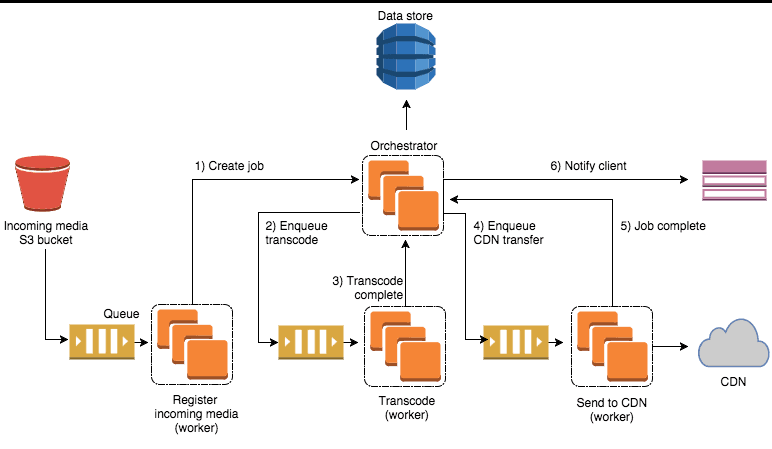
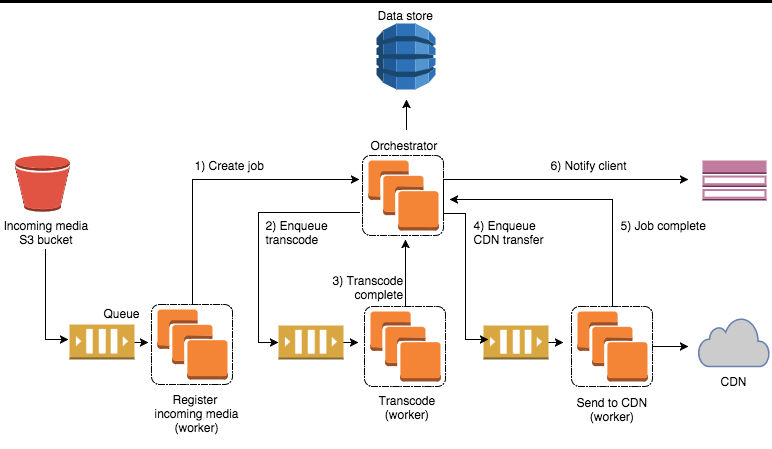
In the world of EdTech and premium content, “uploading a video” is just 5% of the journey. To provide a buffer-free, secure experience, we must transform a single massive MP4 into hundreds of tiny, encrypted segments served via Adaptive Bitrate Streaming (ABR).
Here is how we built a production-ready video pipeline using Node.js, FFmpeg, AWS S3, and Google Shaka Player.
The Ingestion Flow: Decoupling Upload from Logic
We avoid routing heavy video bytes through our main API server. Instead, we use S3 Presigned URLs.
The Request Pattern
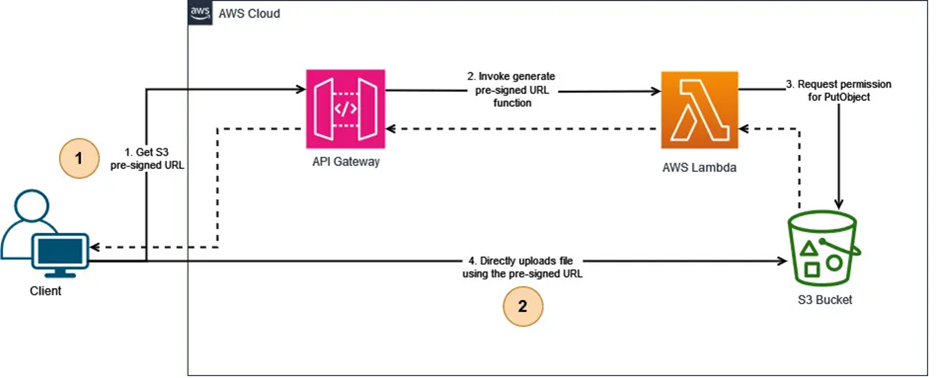
Using multipart/form-data for large videos is risky. Implement S3 Multipart Uploads in the frontend for files >100MB, allowing for retries on individual chunks if the network flickers.
The Trigger: Event-Driven Orchestration
Once the S3 upload returns 200 OK, the frontend calls our confirm-upload API.
Why not S3 Triggers?While S3 can trigger Lambda automatically, a manual confirmation API gives the application layer control to validate business logic (e.g., “Does this user have remaining storage quota?”) before spinning up expensive compute resources.
The Message Queue (SQS / BullMQ)
The API doesn't start transcoding immediately. It pushes a job into a message queue (Redis-backed BullMQ or AWS SQS).
// Example Job Payload
{
  "lessonId": "lesson_123",
  "inputKey": "uploads/raw/math_lecture.mp4",
  "userId": "user_456",
  "drmEnabled": true
}
The Transcoding Worker: FFmpeg & HLS
Our worker fleet (running on EC2 Spot Instances or Fargate for cost optimization) pulls jobs from the queue.
Deep Engineering: The FFmpeg Command
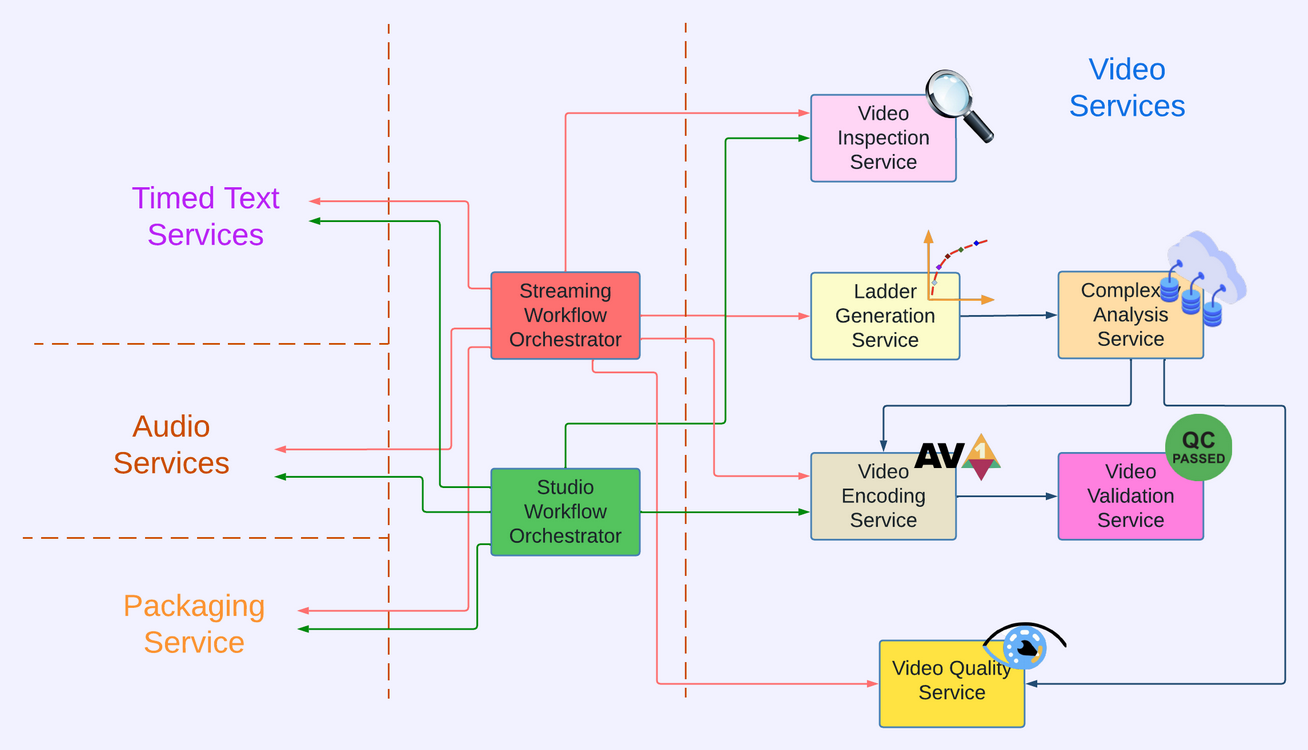
We don't just “convert” the video. We generate an HLS (HTTP Live Streaming) stack. This creates a Master Playlist (.m3u8) and multiple stream variants (1080p, 720p, 480p).
ffmpeg -i input.mp4 \
  -map 0:v -map 0:a -s:v:0 1920x1080 -b:v:0 5000k \
  -map 0:v -map 0:a -s:v:1 1280x720  -b:v:1 2800k \
  -map 0:v -map 0:a -s:v:2 854x480   -b:v:2 1400k \
  -f hls -hls_time 10 -hls_playlist_type vod \
  -master_pl_name master.m3u8 \
  -var_stream_map "v:0,a:0 v:1,a:1 v:2,a:2" \
  output_%v.m3u8
Post-Processing
The generated .ts segments and .m3u8 files are synced to a private S3 bucket.
The input.mp4 is automatically purged from the Raw bucket to save storage costs.
The database record is updated to status: PUBLIC and notifications are dispatched.
Content Protection: Multi-DRM (Widevine)
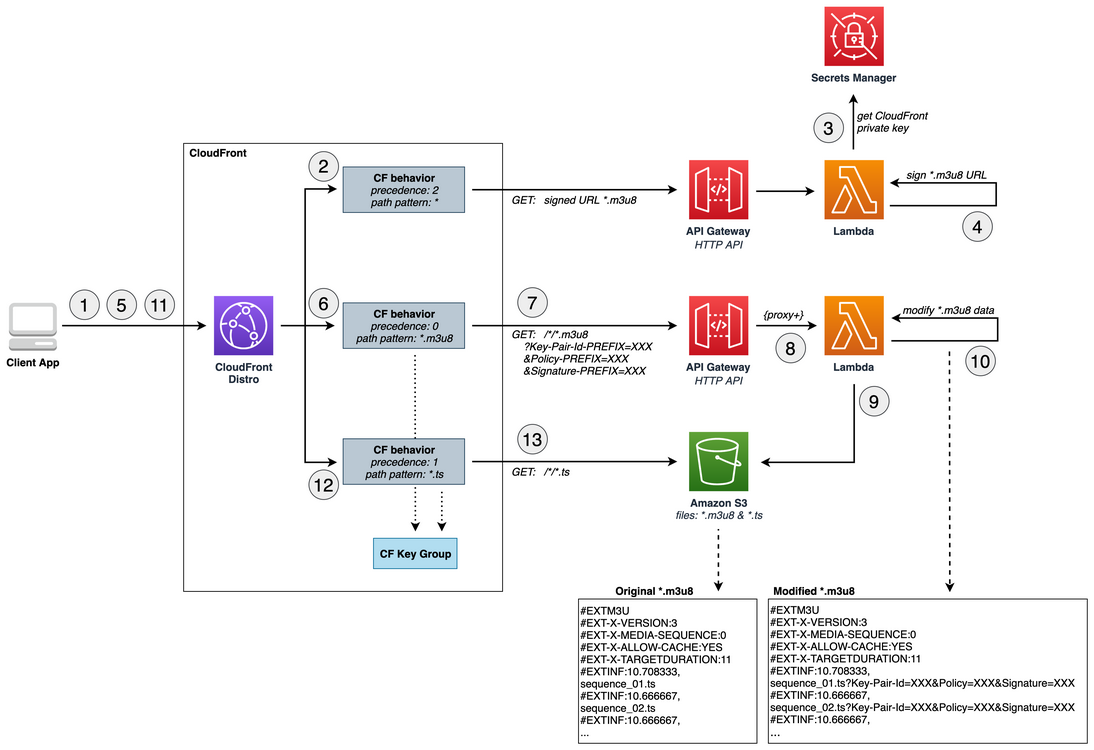
For videos requiring DRM, we use Google Widevine. Shaka Player is the industry standard here because it handles the complex Encrypted Media Extensions (EME) handshake seamlessly.
The Shaka Player Configuration
Your frontend doesn't just need the video URL; it needs a License Server URL.
const player = new shaka.Player(videoElement);

player.configure({
  drm: {
    servers: {
      'com.widevine.alpha': 'https://license.provider.com/get-license',
      'com.apple.fps': 'https://fairplay.provider.com/get-license' // Optional for Safari
    }
  }
});

// Load the signed manifest URL
await player.load(signedManifestUrl);
Secure Playback: Signed Cookies vs. Signed URLs
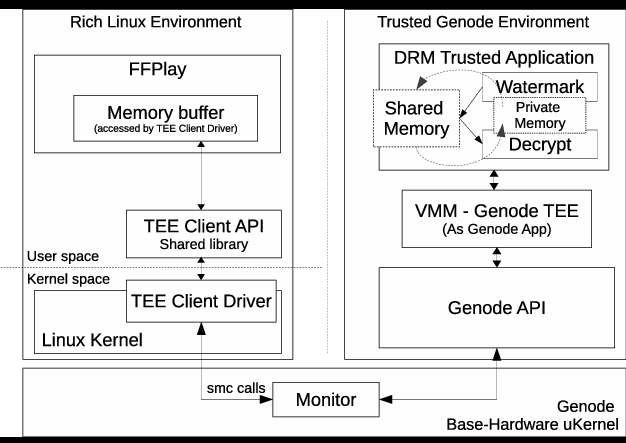
For HLS, there is a major technical hurdle: A single signed URL for the .m3u8 is not enough. The player will successfully download the playlist but will be blocked when it tries to fetch the individual .ts segments.
The Solution: CloudFront Signed Cookies
Instead of signing every individual segment, our get-video-signer-url API sets CloudFront Signed Cookies.
// CloudFront Signed Cookie Flow
// 1. Request: User clicks "Play"
// 2. API: Verifies user permissions
// 3. Response: Returns CloudFront URL and sets cookies

res.cookie('CloudFront-Policy', policy, { httpOnly: true, secure: true });
res.cookie('CloudFront-Signature', signature, { httpOnly: true, secure: true });
res.cookie('CloudFront-Key-Pair-Id', keyPairId, { httpOnly: true, secure: true });

// 4. Browser automatically sends these cookies with every .ts segment requestCloudFront Signed Cookies eliminate the need to sign every individual .ts segment, while maintaining complete access control. This allows Shaka Player to play the entire stream securely while keeping the S3 bucket 100% private.
Summary of Engineering Choices
| Component | Choice | Rationale |
|---|---|---|
| Bucket Strategy | Two-bucket architecture | Ingestion bucket with 24h lifecycle, Private distribution bucket via CloudFront |
| Worker Scalability | HPA on K8s or SQS-based Scaling | Spin up more workers as queue grows, optimize costs with spot instances |
| Player Choice | Shaka Player | Best ABR logic for switching bitrates mid-stream without dropping frames |
| Security | CloudFront Signed Cookies + DRM | Edge-level access control combined with license-based content protection |
By moving the heavy lifting to specialized workers and securing the delivery at the Edge (CDN), you've built a system that can scale from 10 students to 10 million.