In the world of SaaS, “simple” is a dangerous word.
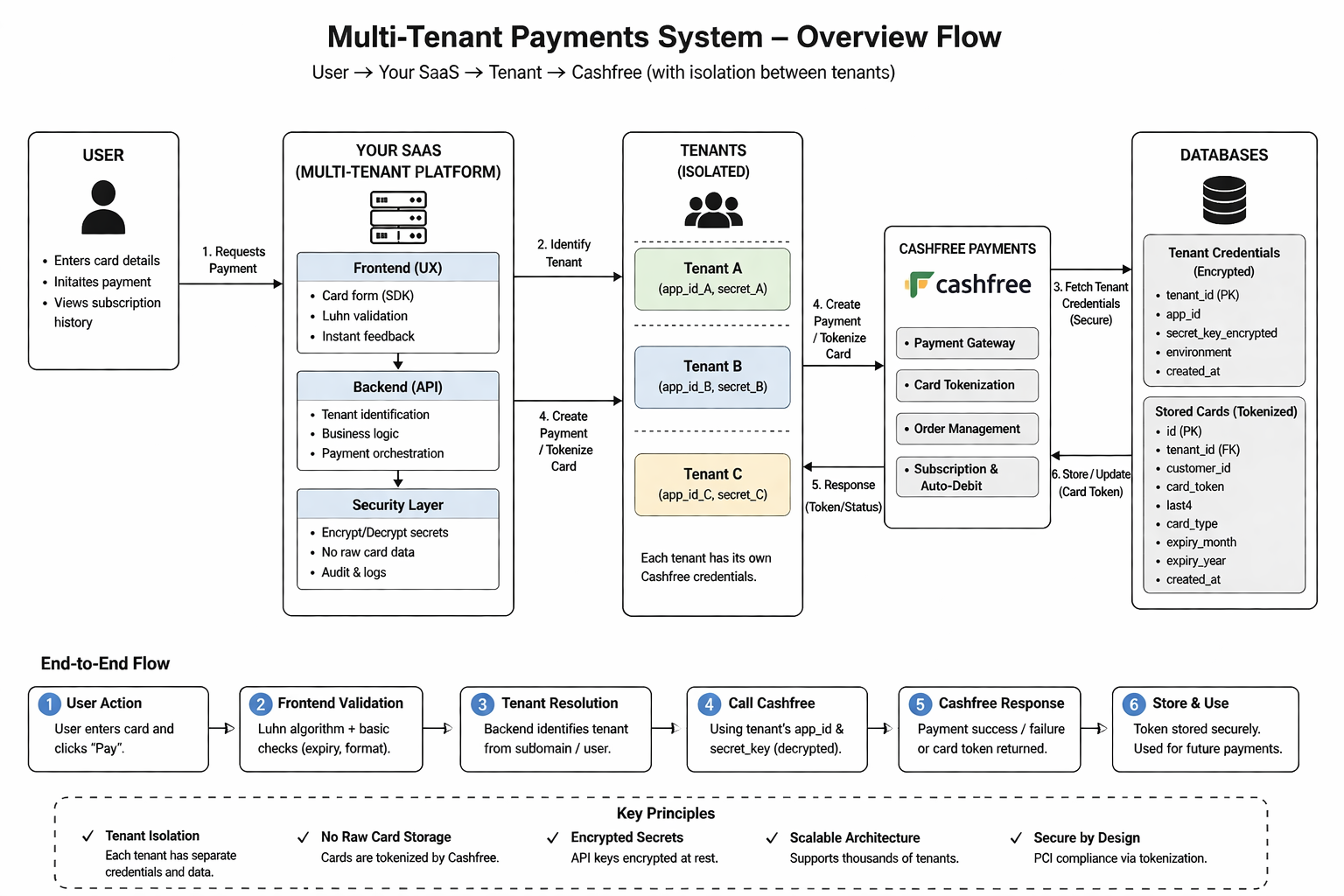
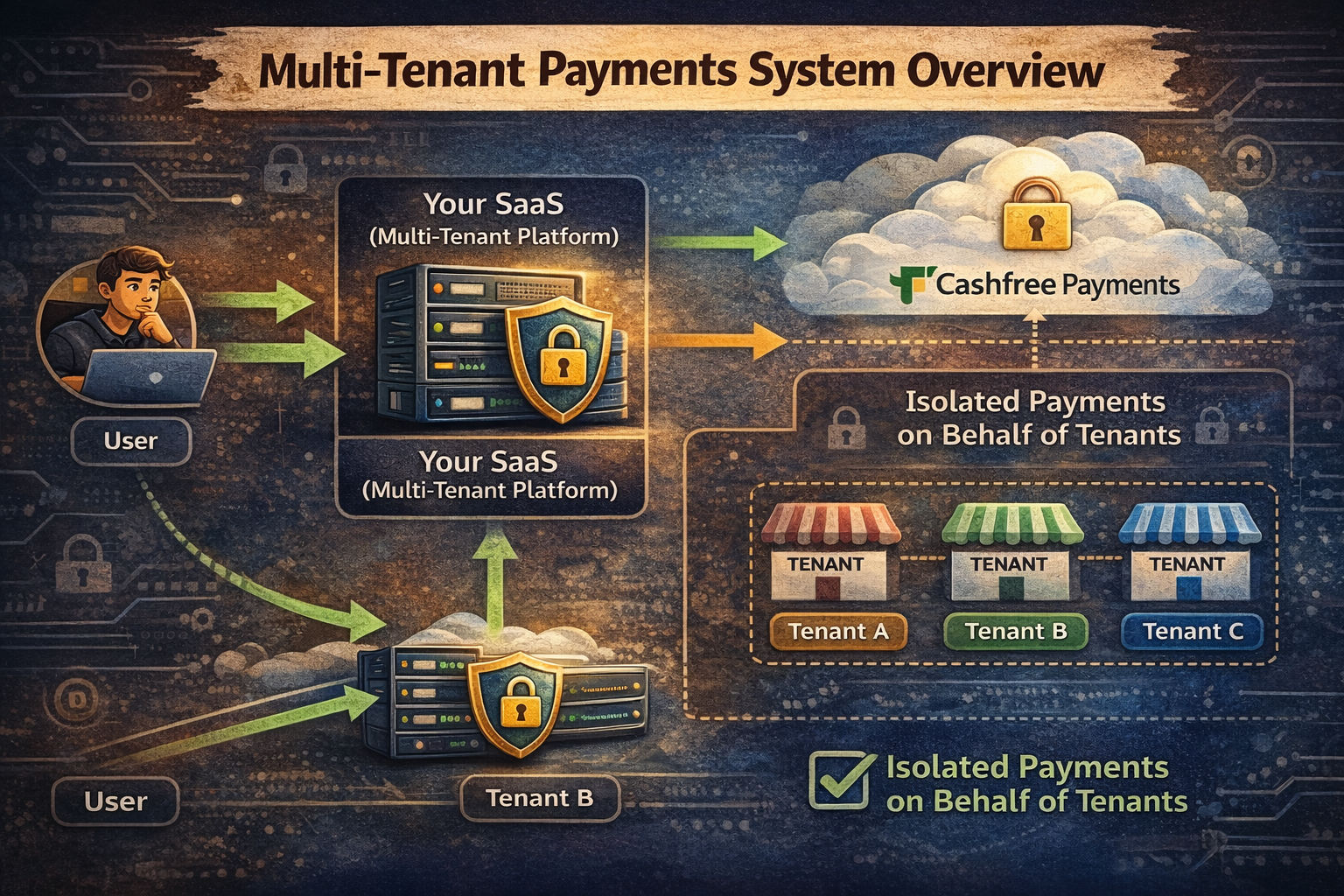
I recently built a multi-tenant payment system where each business (tenant) on our platform needs to process their own payments, manage recurring subscriptions, and vault customer payment methods. Whether a tenant prefers to connect Cashfree, Razorpay, or Stripe, each merchant operates under complete provider isolation. It sounds straightforward—until you realize you are balancing PCI compliance, data isolation, and frictionless UX all at the same time.
Here is how we built a production-ready multi-tenant payment architecture supporting pluggable merchant gateways, provider-side tokenization, and the Luhn algorithm (and why the Luhn check almost tricked me into a false sense of security).
The Requirements: Where Things Got Real
To keep this system secure and scalable, we had four non-negotiable architectural constraints:
Each tenant connects their own gateway credentials (Cashfree, Razorpay, or Stripe). Tenant A's revenue and customer charges never touch Tenant B's merchant account.
We never touch or store raw card numbers (PANs) or CVVs on our servers. Ever. Not in the database, and never in application logs.
Tenant API keys and webhooks secrets are never stored in plain text. They are encrypted using AES-256 at rest and decrypted in memory only when executing API requests.
Saved payment methods are stored via provider-side tokens, keeping our platform completely outside PCI DSS audit scope.
Multi-Tenant Payments: The Gateway Credentials Setup
Each tenant configures their own merchant gateway. For example, if a tenant connects Cashfree, we store their merchant identifiers and encrypted secrets so our backend can process orders and subscriptions directly on their behalf.
What We Store in the Database
{
  "tenant_id": "tenant_123",
  "provider": "cashfree", // or "razorpay" | "stripe"
  "app_id": "CF_PROD_AX2",
  "secret_key": "AES_256_ENCRYPTED_BLOB", // Decrypted only in backend memory
  "environment": "production",
  "created_at": "2026-01-26T10:00:00Z"
}The secret_key is encrypted before persisting to PostgreSQL. It is decrypted in memory only when constructing the gateway API client for an incoming transaction. The client browser never receives or touches these merchant credentials.
How It Works
tenant_id + order amount to our backend.secret_keyin memory only → Instantiates the tenant's provider SDK → Calls order creation API → Returns a secure session token to frontend.import { Cashfree } from "cashfree-pg"
export async function createTenantOrder(tenantId: string, orderData: OrderData) {
// 1. Fetch and decrypt credentials
const tenant = await getTenantCredentials(tenantId)
const secretKey = decrypt(tenant.secret_key)
// 2. Initialize provider instance for this specific tenant request
const cashfree = new Cashfree({
mode: tenant.environment,
appId: tenant.app_id,
secretKey: secretKey,
})
// 3. Create order with tenant routing context in notify_url
const response = await cashfree.PGCreateOrder({
order_id: `order_${Date.now()}`,
order_amount: orderData.amount,
order_currency: "INR",
customer_details: {
customer_id: orderData.customerId,
customer_email: orderData.customerEmail,
customer_phone: orderData.customerPhone,
},
order_meta: {
return_url: `https://app.com/orders/{order_id}`,
notify_url: `https://api.com/webhooks/cashfree/${tenantId}`,
},
})
return response.data
}Notice that notify_url includes the tenantIdin the path. This is essential in multi-tenant architectures: when the payment provider dispatches an asynchronous webhook event, our ingestion endpoint immediately knows which tenant's secret key to fetch and decrypt to verify the cryptographic HMAC signature.
Saving Cards for Recurring Payments
Managing auto-debit for subscriptions required a secure mechanism to “remember” cards without increasing our regulatory liability.
What We Do Instead: Provider-Side Tokenization
{
  "customer_id": "cust_789",
  "tenant_id": "tenant_123",
  "card_token": "tok_xxxxx",  // Returned by the payment provider
  "last4": "4242",
  "card_type": "VISA",
  "expiry_month": "08",
  "expiry_year": "2028"
}The card_tokenis scoped exclusively to that merchant account within the payment gateway. Even in the catastrophic event of a database dump, the tokens are completely useless to an attacker outside the provider's ecosystem. This keeps our platform fully scalable for subscriptions across thousands of tenants with zero PCI audit overhead.
The Rabbit Hole: “Can I Validate Cards Without APIs?”
While optimizing the checkout experience, I wanted instant feedback for users typing card details without hitting network round-trips on every keystroke. I wondered:
“Do I really need to hit a payment API over the network just to check if a card number is formatted correctly?”
That's when I discovered the Luhn Algorithm (also known as the Mod 10 check). And for a moment… it felt like an ingenious shortcut.
Explaining Luhn Like You're 5
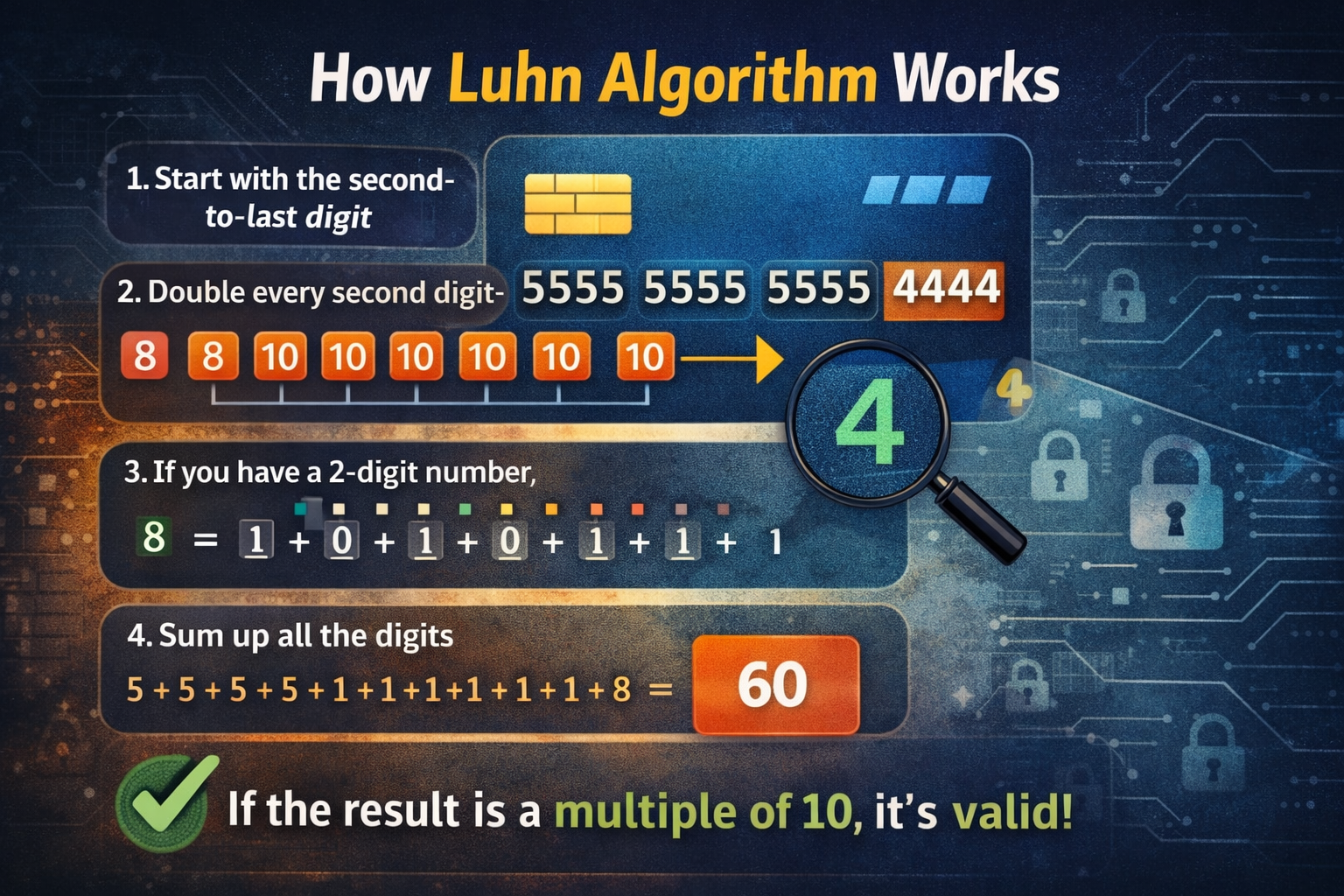
Let's trace an example card number: 5555 5555 5555 4444
Start from the second-to-last digit, moving backwards toward the start.
4 → 4 × 2 = 8 | 5 → skip | 5 → 5 × 2 = 10 | 5 → skip | 5 → 10... Resulting in: 8, 10, 10, 10, 10...
If doubling yields ≥ 10, sum the digits: 10 → 1 + 0 = 1 (or subtract 9). The 8 remains 8.
1 + 5 = 6, 6 + 1 = 7, 7 + 5 = 12... Accumulating to a total of 60.
If Total % 10 === 0, the card number is mathematically valid. Since 60 % 10 = 0 → Valid!
Clean JavaScript Implementation
Here is a production-friendly version that is clean, readable, and performant:
/**
 * Validates a card number using the Luhn Algorithm (Mod 10).
 * Note: Checks mathematical checksum format, NOT active funds or account existence.
 */
function luhnCheck(cardNumber) {
  const digits = cardNumber
    .replace(/\D/g, '')  // Remove spaces, hyphens, and non-digits
    .split('')
    .reverse()
    .map(Number);

  let sum = 0;

  for (let i = 0; i < digits.length; i++) {
    let digit = digits[i];

    // Double every second digit
    if (i % 2 === 1) {
      digit *= 2;
      // If greater than 9, subtract 9 (equivalent to summing the two digits)
      if (digit > 9) {
        digit -= 9;
      }
    }

    sum += digit;
  }

  return sum % 10 === 0;
}

// Examples
console.log(luhnCheck("5555555555554444")); // true
console.log(luhnCheck("1234567890123456")); // false
Where I Was Wrong (An Important Engineering Lesson)
For a brief moment, I thought:
“This means I can validate cards on my own without relying on any payment gateway API calls.”
Nope.
Luhn only checks format and checksum integrity. It does NOT check: whether the card actually exists, whether the CVV is correct, whether the issuing bank will approve the debit, or whether the customer has sufficient balance. You can generate millions of fake, mathematically “valid” card numbers all day.
“I'll use Luhn to validate the card so I don't need a payment gateway yet.”
“Luhn is a UI helper for instant user feedback, not a security or authorization control.”
Luhn checks syntax, not semantics. A mathematically valid card number could be expired, stolen, cancelled, or completely fabricated. It is the equivalent of checking whether a phone number has 10 digits versus checking whether someone actually answers when you dial.
The Final Architecture: How It Actually Flows
User inputs card digits → Frontend runs local Luhn and length checks → Highlights typos in red instantly before any network call.
Card data is securely dispatched directly from the browser to the payment provider SDK (Cashfree, Razorpay, or Stripe). Our application backend never touches the raw PAN.
Provider returns a sanitized card_token → Our backend stores the token alongside the card brand, last 4 digits, and expiration, strictly partitioned by tenant_id.
When processing a subscription renewal: Backend retrieves tenant credentials + customer token → Dispatches charge request to provider → Handles webhook confirmation.
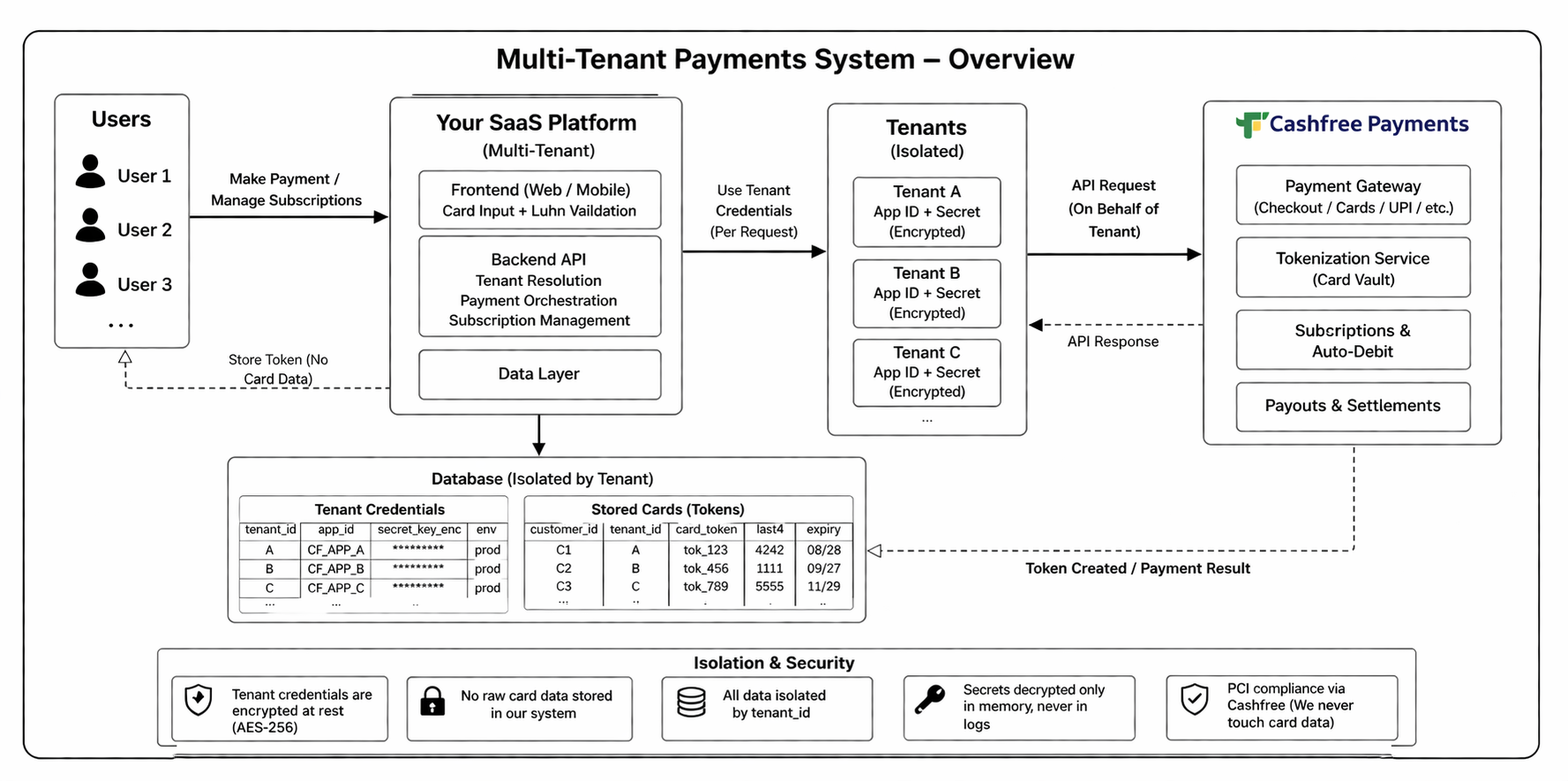
Summary of Engineering Choices
| Component | Choice | Rationale |
|---|---|---|
| Payment Gateways | Cashfree, Razorpay, Stripe | Multi-tenant merchant isolation, regional & international coverage |
| Card Validation | Luhn Check (Frontend only) | Instant user feedback on typos, not an authorization control |
| Card Storage | Provider-Side Tokenization | Zero PCI DSS compliance overhead; tokens are useless outside provider |
| Tenant Credentials | AES-256 Encrypted at Rest | Decrypted in memory only during active transaction requests |
| Recurring Billing | Token-Based Auto-Debit | No CVV storage required; fully compliant and automated |
Key Takeaways (From an Engineer Who Almost Over-Engineered This)
It is an instant frontend sanity check for user typos, never a replacement for real payment gateway authorization.
Tokenization keeps your database completely out of PCI scope. Always move tokens, not Primary Account Numbers.
Even in the event of an infrastructure breach, your tenants' businesses and API credentials remain fully protected.
Payment providers spend millions on financial compliance. Let their client SDKs handle sensitive inputs.
Building a single-tenant checkout is straightforward. Architecting a secure, multi-tenant financial foundation where each tenant brings their own gateway? That is where real backend engineering begins.
Ending Thought
That “trick” I found? It wasn't a shortcut. It was just step one of understanding how deep payment systems actually go.
And honestly… that is where real engineering starts.